

Your smartphone is a powerful tool for preserving precious family memories. With it always in your pocket, you possess the capability to capture spontaneous joy, everyday milestones, and significant events instantly. Moving beyond simple point-and-shoot, you can significantly elevate the quality of your family photos by understanding a few key techniques and settings. This guide provides practical steps to transform your mobile camera into a sophisticated memory-capturing device, ensuring your family’s story unfolds beautifully through your lens.
Your device is also remarkably capable of digitizing old physical prints using specialized scanning apps, helping you preserve your entire family history.
Master Your Smartphone Camera’s Capabilities
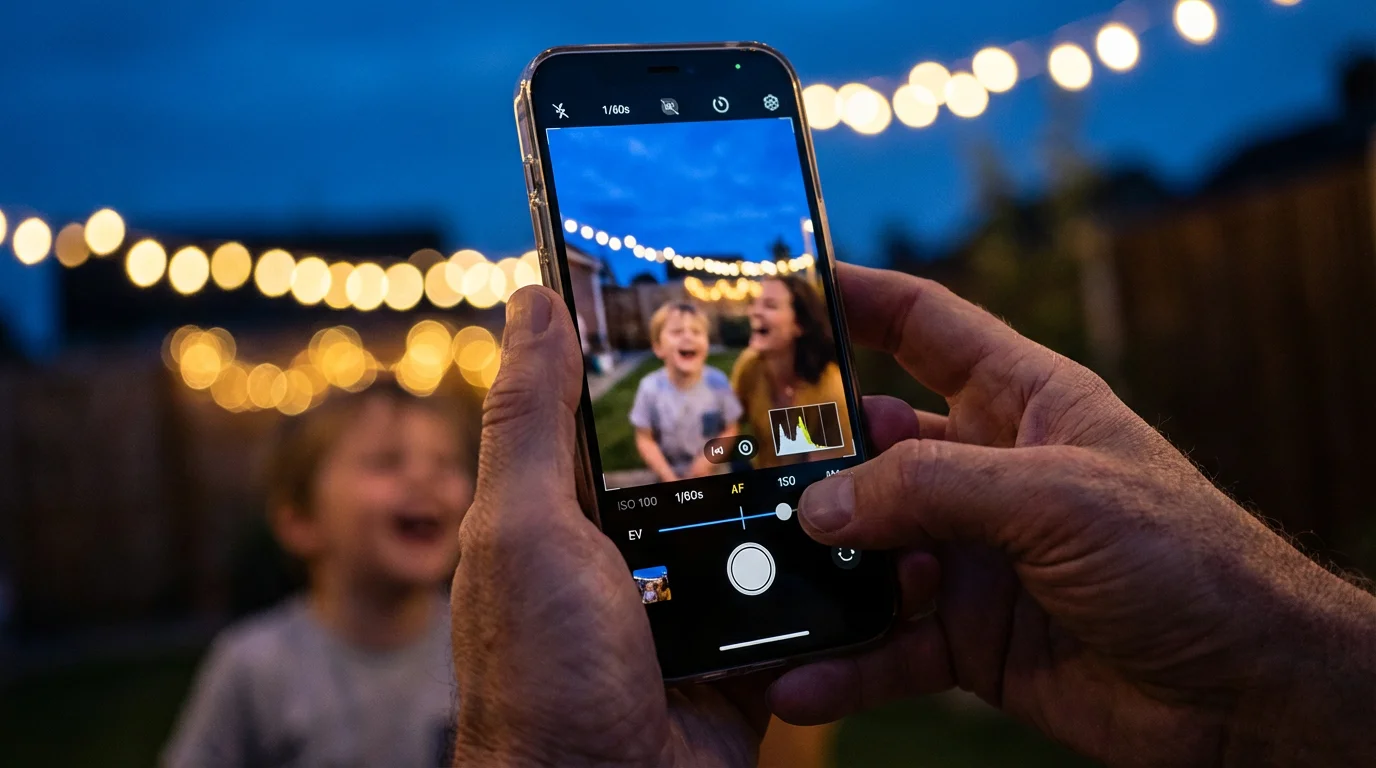
Your smartphone camera offers a range of features designed to enhance your photos, often hidden within the default camera app. Understanding these tools empowers you to take better family photos with your smartphone. Most modern smartphones include advanced computational photography features that automatically improve images, yet manual adjustments unlock even greater potential.
Beyond basic features, understanding camera settings for indoor photos is essential when capturing moments inside the home.
- Explore Camera Modes: Your phone likely includes modes such as “Portrait,” “Night Mode,” “Panorama,” and “Burst Mode.”
- Portrait Mode: This mode creates a shallow depth of field, blurring the background to make your subject stand out. It excels at individual and small group portraits. Experiment with the depth effect slider if your phone offers it, adjusting the intensity of the background blur after capturing the shot.
- Night Mode: For low-light situations, Night Mode extends the exposure time, capturing more light to produce brighter, clearer images with reduced noise. Hold your phone steady during the capture process, as even slight movement blurs the image.
- Burst Mode: When photographing active children or pets, Burst Mode captures a rapid sequence of photos with one press of the shutter button. This increases your chances of catching the perfect expression or action shot. You can then select the best image and discard the rest.
- Understand Exposure Control: Tapping on your subject on the screen usually sets the focus and exposure. A sun or brightness slider often appears next to the focus box. Dragging this slider up brightens the image, while dragging it down darkens it. Use this for situations where your phone’s automatic exposure over or underexposes your subject, such as when backlighting occurs. For instance, if you photograph your child against a bright window, manually decrease the exposure to prevent the child from appearing as a silhouette.
- Activate the Grid: Most camera apps offer an option to overlay a grid, typically a 3×3 square. This grid helps you apply compositional rules, like the rule of thirds, by aligning subjects or horizon lines along the grid lines or their intersections. Access this setting through your camera app’s settings menu.
“The best camera is the one you have with you. For most people today, that is a smartphone. Learn its nuances, and you will capture incredible memories.”

Leverage Natural Light for Stunning Family Photos
Light is the single most important element in photography. Good light transforms an ordinary snapshot into a captivating image. Smartphone photography benefits immensely from utilizing natural light effectively, making your family photos vibrant and lifelike. Avoid harsh, direct sunlight, which often creates unflattering shadows and blown-out highlights.
- The Golden Hour: The hour after sunrise and the hour before sunset, known as the “golden hour,” provides soft, warm, directional light. This light flatters skin tones and adds a beautiful glow to your subjects. Plan outdoor family photos during these times for truly magical results.
- Open Shade: When the sun shines brightly mid-day, seek out open shade, such as under a large tree, a covered porch, or on the shaded side of a building. Open shade offers soft, even light that eliminates harsh shadows and prevents subjects from squinting. Ensure the background behind your subjects remains bright, as this helps illuminate them evenly.
- Window Light Indoors: Inside, position your subjects near a large window. Window light acts as a softbox, providing diffused and flattering illumination. Turn off overhead lights that can create unflattering color casts or harsh shadows. Position your subjects facing the window for frontal lighting, or slightly to the side for more dramatic effects.
- Avoid Direct Midday Sun: Between 10 AM and 4 PM on a sunny day, the sun sits high overhead, creating strong, unflattering shadows under eyes and noses. It also causes subjects to squint. If you must shoot during this time, find shade, or have your subjects turn their backs to the sun and use your phone’s flash for fill light if available. Alternatively, utilize the exposure slider to balance the bright background with your subjects.

Composition Fundamentals: Framing Your Family Moments
Composition refers to how you arrange elements within your frame. Strong composition guides the viewer’s eye and adds visual appeal to your family photos. Mastering these basic principles helps you create visually engaging mobile camera tips for memorable images.
- The Rule of Thirds: Imagine your image divided into nine equal sections by two horizontal and two vertical lines (your phone’s grid helps with this). Place your subjects or points of interest along these lines or at their intersections. This creates a more dynamic and balanced image than simply centering everything. For instance, position a child’s eyes on an upper intersection point rather than directly in the middle of the frame.
- Leading Lines: Utilize natural lines in your environment to draw the viewer’s eye toward your subject. Paths, fences, rivers, or even rows of trees can serve as leading lines. Capture your family walking down a path, using the path itself to lead the eye to them.
- Symmetry and Patterns: Look for opportunities to use symmetry, such as reflections in water or architectural patterns. Symmetrical compositions create a sense of balance and harmony. Patterns, like repeating textures or shapes, add visual interest. However, break the pattern with your subject to prevent the image from appearing too static.
- Fill the Frame: Do not be afraid to get close to your subjects. Filling the frame eliminates distracting backgrounds and focuses attention on the person or interaction you want to highlight. Zoom in with your feet, not your phone’s digital zoom, as digital zoom reduces image quality.
- Consider Your Background: Before taking a shot, quickly scan the background for distractions. A cluttered background pulls attention away from your subjects. Reposition yourself or your subjects slightly to achieve a cleaner, less distracting backdrop. A simple, out-of-focus background works best for portraits.
- Shoot from Different Perspectives: Most people photograph from eye level. Experiment by shooting from a low angle, looking up at your subjects, or from a high angle, looking down. Get down to a child’s eye level to capture their world from their perspective, creating more intimate and engaging portraits.

Capturing Authentic Expressions and Candid Shots
The most cherished family photos often capture genuine emotions and unposed interactions. Moving beyond stiff smiles, you can document the true essence of your family life. These strategies help you capture how to take better family photos with smartphone capabilities for authentic moments.
- Be Patient and Observant: Candid photography requires patience. Instead of commanding subjects to pose, observe their interactions. Watch for moments of laughter, concentration, or affection. Anticipate these moments and be ready with your camera. For example, during a family meal, keep your phone handy to capture a spontaneous chuckle.
- Engage Your Subjects Naturally: Especially with children, turn photography into a game or an activity. Ask them to tell a story, play with a toy, or interact with a sibling. This diverts their attention from the camera, resulting in more natural expressions. Tell a joke or sing a silly song to elicit genuine smiles.
- Shoot in Sequence with Burst Mode: As mentioned, Burst Mode is invaluable for capturing action and rapidly changing expressions. When children play, activate Burst Mode to capture a series of frames. You will often find one image in the sequence that perfectly freezes the action or reveals an unforced smile.
- Shoot from the Hip: Sometimes, holding your phone discreetly at waist level and snapping photos without looking through the screen yields surprisingly candid results. People tend to relax when they do not feel the camera’s direct gaze. Practice this technique to get a feel for framing without direct sight.
- Focus on Interactions, Not Just Individuals: Capture siblings playing, a parent comforting a child, or grandparents sharing a story. These interactions convey strong emotional connections and tell a more compelling story than isolated portraits. For example, instead of just a photo of your child, capture them holding their parent’s hand.

Essential Smartphone Settings for Portraits and Groups
Optimizing your best smartphone settings for portraits and group shots makes a significant difference in the final image quality. These specific adjustments leverage your phone’s capabilities to highlight your subjects effectively.
- Tap to Focus and Lock Exposure: Before taking a portrait, tap your subject’s face on the screen. This ensures precise focus. Often, holding your finger down on the screen for a second or two will “lock” both the focus and exposure (indicated by an “AE/AF Lock” message). This prevents the camera from refocusing or re-exposing if your subject moves slightly or the light changes. It is particularly useful when photographing multiple people or dynamic scenes.
- Adjust Exposure Compensation (Brightness Slider): After tapping to focus, a small sun icon or brightness slider typically appears. Drag this up to brighten your subject if they appear too dark, or down to darken if they seem overexposed. This control is crucial for balancing the light, especially when you have a brighter background than your subject.
- Utilize Portrait Mode (Bokeh Effect): Many modern smartphones feature a “Portrait Mode” that simulates a professional camera’s shallow depth of field, blurring the background (bokeh effect) while keeping your subject sharp. This effect makes your family members stand out beautifully. Experiment with different light sources when using Portrait Mode, as it performs best in well-lit conditions. Some phones also allow you to adjust the blur strength after taking the photo.
- Use the Volume Button as a Shutter: For stability, use your phone’s volume buttons as a physical shutter release. This reduces camera shake compared to tapping the on-screen button, especially when holding the phone at awkward angles for group shots or low-angle portraits.
- Disable Flash in Most Cases: The built-in flash on smartphones often produces harsh, flat lighting and red-eye. Rely on natural light whenever possible. If you must use flash, try to diffuse it by placing a piece of translucent tape over it, or use it judiciously as a fill flash outdoors in bright sunlight to soften shadows on faces.
- Consider a Tripod for Group Shots: For large group photos, especially in low light, a small smartphone tripod or a stable surface significantly improves sharpness by eliminating camera shake. This also allows you to use the self-timer, enabling you to join the group photo yourself.

Simple Editing Techniques to Enhance Your Family Photos
Post-processing significantly elevates your smartphone photography. You do not need complex software; your phone’s built-in editing tools or free third-party apps provide powerful capabilities to refine your images. Even minor adjustments improve clarity, color, and overall impact.
While native camera tools are powerful, you can achieve professional-grade results by using some of the best mobile photo editing apps available today.
Most smartphone photo editors offer a suite of tools. Focus on these fundamental adjustments:
- Cropping and Straightening: This is often the first and most impactful edit. Crop to remove distracting elements from the edges of your frame, and straighten horizons or vertical lines for a more professional look. For instance, cropping out half-visible objects in the background immediately cleans up an image.
- Exposure and Contrast:
- Exposure: Adjust the overall brightness of your image. Increase it if the photo appears too dark, decrease it if it looks washed out or overexposed.
- Contrast: This defines the difference between the light and dark areas. Increasing contrast adds punch and depth, while decreasing it creates a softer look. Use it to make subjects pop or to reduce a “flat” appearance.
- Color Correction:
- Saturation: Controls the intensity of colors. Increase saturation slightly for more vibrant hues, but avoid overdoing it, which can make colors look artificial.
- Vibrance: Similar to saturation, but it selectively boosts less saturated colors more, preventing skin tones from looking oversaturated. This provides a more natural color enhancement.
- White Balance (Temperature/Tint): Adjusts the color cast of an image. If your photo appears too warm (orange/yellow) or too cool (blue), use these sliders to achieve a more neutral and accurate color representation. For example, photos taken under fluorescent lights often have a green tint that you can correct here.
- Sharpening: A subtle amount of sharpening can enhance details and make your subjects appear clearer. However, over-sharpening introduces an unnatural, grainy look. Apply it sparingly.
- Highlight and Shadow Recovery: These sliders allow you to reclaim detail in the brightest (highlights) and darkest (shadows) parts of your image. If a sky appears completely white, reducing highlights can bring back cloud detail. If faces are too dark in a shaded area, increasing shadows brightens them without affecting the entire image.
Remember, the goal of editing is to enhance, not to drastically alter, the original scene. Make subtle changes that bring out the best in your family photos.

Organizing and Backing Up Your Precious Digital Memories
Capturing beautiful family photos is only half the battle; proper organization and reliable backups ensure these memories last a lifetime. Many readers have thousands of unorganized digital images, which creates anxiety and the risk of loss. Implement a systematic approach to protect your digital photographic heritage.
Consolidating these mobile captures into a centralized home photo archive ensures they remain accessible for future generations.
If your gallery feels overwhelmed, learning how to organize a large digital photo library will make it much easier to find specific milestones later.
To ensure your new photos are protected from device loss, prioritize setting up automatic photo backup to a secure cloud service.
- Develop a Consistent Naming Convention: When you transfer photos from your phone, rename them with a consistent format. A common and effective method is YYYY-MM-DD_EventName_Description. For example, “2023-10-26_HalloweenParty_KidsCostumes.jpg.” This makes searching and sorting much easier later.
- Create a Logical Folder Structure: Organize your photos into a hierarchical folder system on your computer or external drive. A common structure is Year > Month > Event. For instance: “2023” > “10 October” > “Halloween Party.” This logical arrangement helps you quickly locate specific images.
- Implement a 3-2-1 Backup Strategy: This widely recommended strategy ensures robust protection against data loss.
- 3 copies of your data: Keep your photos on your phone, your computer, and a third location.
- 2 different types of media: Use different storage methods, such as an internal hard drive and an external hard drive.
- 1 offsite backup: Store one copy in a different physical location, such as a cloud service.
For example, your phone holds one copy, your home computer’s hard drive holds another, and a cloud service (like Google Photos, iCloud Photos, or Dropbox) provides the offsite backup. Alternatively, use an external hard drive for one local copy and a cloud service for the offsite. Regularly review your backup systems to ensure their functionality.
- Curate Your Collection: Be selective. After an event, review your photos and delete blurry, duplicate, or unflattering shots. Keep only the best images. This streamlines your collection and makes it easier to manage. You gain clarity and appreciation for the truly outstanding photos.
- Schedule Regular Transfers and Backups: Make photo management a routine. Transfer photos from your phone to your computer or backup service weekly or monthly, depending on your shooting volume. Set a reminder on your calendar to perform these tasks consistently.
Adopting these habits prevents the overwhelming feeling of thousands of unorganized images and ensures your digital family album remains secure and accessible for future generations. For additional resources on preserving digital media, consult reputable organizations such as the National Archives Preservation which offers guidelines on long-term digital storage.

Printing and Displaying Your Family Photo Legacy
Digital photos are convenient, but physical prints offer a tangible connection to your memories and ensure longevity. Printing and displaying your family photos transforms them from digital files into cherished artifacts, creating a lasting legacy. Consider these steps to bring your photos to life.
Your favorite smartphone captures can also be transformed into thoughtful personalized DIY photo gifts for friends and relatives.
Don’t let your images stay trapped on your phone; consider creative photo wall ideas to bring your family story into your daily living space.
- Choose Archival-Quality Prints: When printing precious family photos, select services that use archival-quality inks and papers. These materials resist fading and degradation over time, preserving color accuracy and detail for decades. Standard photo prints often fade after a few years, especially when exposed to light. Look for terms like “acid-free” and “archival pigment inks.”
- Create Photo Albums and Scrapbooks: Organize your printed photos into albums using archival-safe pages and adhesives. Avoid acidic glues or PVC plastic sleeves, which can damage photos over time. Scrapbooks offer a creative way to combine photos with journaling, ephemera, and other mementos, telling a richer story. Ensure all materials, including paper, pens, and embellishments, are acid-free and lignin-free. The Image Permanence Institute provides valuable information on best practices for storing photographic materials.
- Design Photo Books: Many online services allow you to design custom photo books directly from your digital files. These offer a beautiful, durable way to compile entire events, vacations, or annual family highlights into a single volume. Choose lay-flat pages and sturdy covers for a premium feel and enhanced durability.
- Display Photos Thoughtfully: Frame and display your favorite family photos in your home. Use frames with UV-protective glass to shield prints from harmful light, which causes fading. Rotate displayed photos periodically to minimize light exposure to any single print. Consider creating gallery walls to tell a visual story, or place smaller framed prints on shelves and tables.
- Gift Personalized Photo Creations: Photo calendars, mugs, blankets, or ornaments make thoughtful, personalized gifts. These items allow family members to enjoy your photos daily, reinforcing their emotional connection to the memories.
- Digitize Old Family Photos: If you have inherited boxes of old family photos, consider digitizing them. This creates a digital backup and makes them easier to share and enjoy. Use a flatbed scanner for the best quality, or a dedicated photo scanning service for large collections. Once digitized, you can apply the same organization and backup strategies as your born-digital photos. Store original physical prints in archival boxes in a cool, dark, and dry environment.
Bringing your family photos into the physical world creates a tangible heritage that future generations can hold and cherish, ensuring your photographic legacy endures.
Frequently Asked Questions
Can I really take professional-quality family photos with just a smartphone?
Yes, you absolutely can. While professional cameras offer more control and larger sensors, modern smartphones feature advanced optics and computational photography. Mastering natural light, composition, and basic editing allows you to capture stunning, professional-looking family photos that rival those from dedicated cameras in many common scenarios. The key lies in understanding your device’s capabilities and applying fundamental photographic principles consistently.
What is the most important tip for taking candid family photos?
Patience and observation are the most important tips for candid family photos. Instead of posing subjects, observe their natural interactions and anticipate moments of genuine emotion or activity. Keep your phone ready, use burst mode for action, and avoid interrupting the scene. This approach yields authentic expressions and tells a more compelling story of your family’s life.
How can I make sure my smartphone photos are properly backed up?
Implement the 3-2-1 backup strategy to ensure your smartphone photos are properly backed up. This involves having three copies of your data, stored on two different types of media, with one copy located offsite. For example, keep photos on your phone, an external hard drive, and a cloud service like Google Photos or iCloud. Regularly schedule these backups to prevent loss.
What is the best way to print smartphone photos for long-term preservation?
For long-term preservation, print smartphone photos using archival-quality inks and acid-free paper from reputable photo labs. These materials resist fading and degradation. Store your prints in archival-safe albums or boxes, avoiding direct sunlight and extreme temperatures. Digitizing old physical photos also creates a valuable backup for future generations.
Disclaimer: This article is for informational purposes only. When handling valuable or irreplaceable photographs, consider consulting a professional conservator. Always test preservation methods on non-valuable items first.




Leave a Reply