

Managing shared family archives across Google Drive, iCloud, and Dropbox leaves you drowning in altered duplicates. Exact byte-matching tools fail on re-compressed cloud uploads, while automated cleaners routinely destroy your highest-resolution master files.
Most consumer guides recommend blind automated sweeps. However, byte-level hashing cannot recognize re-encoded copies, whereas uncalibrated perceptual algorithms erase intentional, historic family crops.
You need a staged inspection workflow that distinguishes compression artifacts from unique compositions. Mastering perceptual hashing versus cryptographic hashing protects your archival masters across fractured multi-cloud storage environments.
How Cloud Storage Silently Alters Image Data
Consumer cloud storage providers optimize for bandwidth and storage costs rather than archival fidelity. When family members upload vintage scans or digital camera files, background processes immediately modify the underlying bitstream.
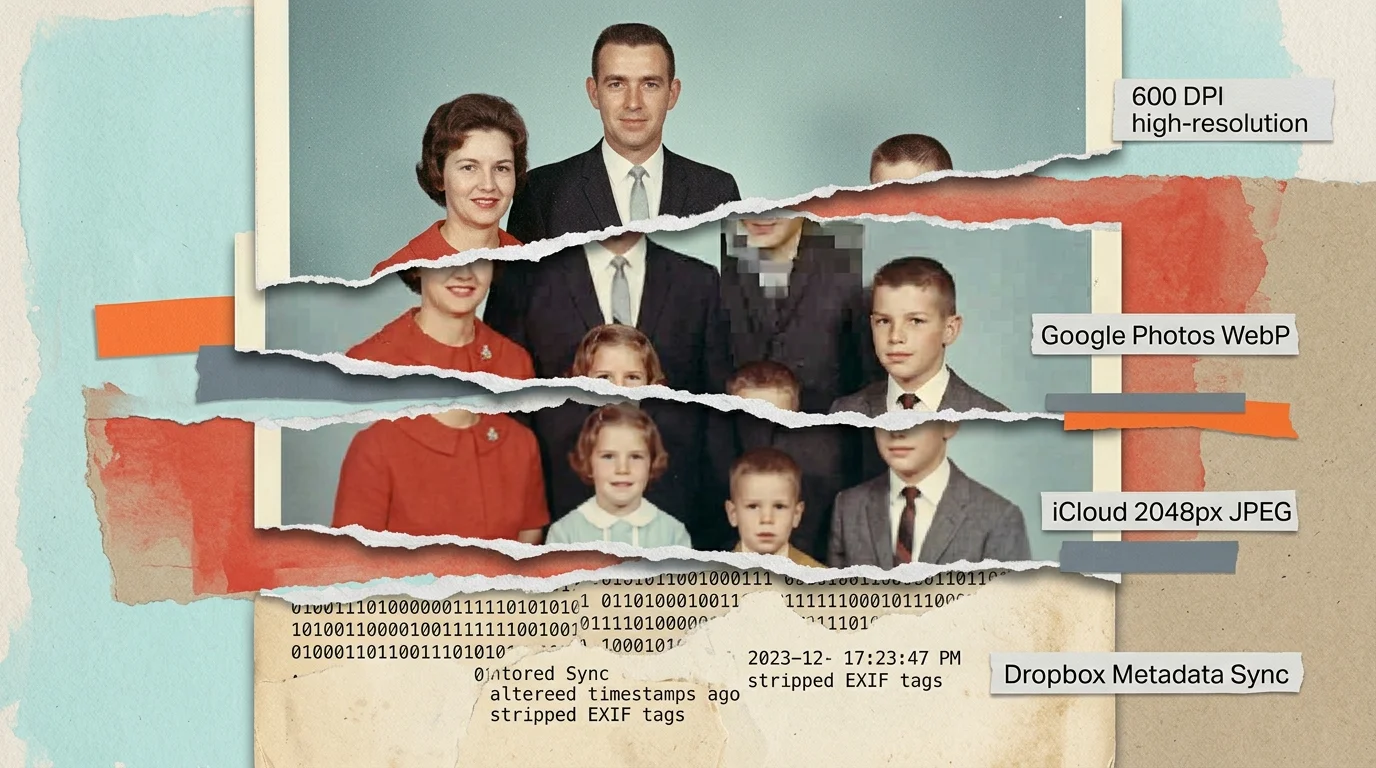
Google Photos applies aggressive WebP or JPEG compression routines unless users select original quality. Apple iCloud Shared Albums transcodes raw camera captures and scans into downscaled 2048-pixel JPEGs to speed up mobile syncing.
Dropbox and OneDrive frequently alter embedded file headers during upload syncing. These platforms rewrite file creation dates to match synchronization timestamps rather than the camera shutter event.
These background changes alter the binary composition of your photos without changing what your eyes see. A family portrait scanned at 600 DPI becomes three distinct digital files across three different cloud accounts.
Social sharing adds another layer of destruction to your multi-cloud family archives. Files routed through WhatsApp, Facebook Messenger, or iMessage lose all EXIF metadata and undergo aggressive color subsampling.
When you gather these folders into a centralized archive, standard system utilities treat each version as completely unrelated. Understanding these transformations is the first step toward reclaiming your family heritage.

Cryptographic MD5 vs. Perceptual pHash Algorithms
To safely clean your library, you must understand the distinction between exact checksums and visual fingerprints. Choosing a phash vs md5 photo finder determines whether your deduplication preserves or destroys family history.
Cryptographic hash functions like MD5, SHA-1, and SHA-256 process files as arbitrary byte sequences. They use an avalanche design: changing a single bit in a 50-megabyte TIFF flips over 50 percent of the resulting checksum.
If Google Drive strips an EXIF copyright tag from a master scan, its MD5 signature shifts entirely. A binary deduplicator will report zero matches between the original file and the cloud copy, leaving both intact.
Perceptual hashing (pHash) solves this problem by analyzing visual structures rather than raw bytes. The algorithm converts an image to grayscale, shrinks it to a 32×32 pixel matrix, and applies a Discrete Cosine Transform.
The Discrete Cosine Transform isolates low-frequency luminance changes, capturing the basic shapes and gradients of the photograph. The algorithm then derives a compact 64-bit integer fingerprint from these primary frequency bands.
Perceptual hashing evaluates how human vision perceives a picture rather than how a hard drive stores the binary data. Minor compression artifacts leave the visual fingerprint virtually unchanged.
Engineers measure the difference between two perceptual hashes using Hamming distance. This metric counts the exact number of differing bit positions between two 64-bit fingerprints.
A Hamming distance of 0 indicates visually identical images with differing binary structures. A distance between 1 and 4 represents minor compression or slight color grading, while distances above 10 indicate distinct images.
The Cropped Photo Trap: Why Near-Duplicates Vanish
Automated duplicate finders introduce severe risks when encountering cropped images. You must actively configure your tools to avoid deleting cropped original photos that family members edited for specific projects.
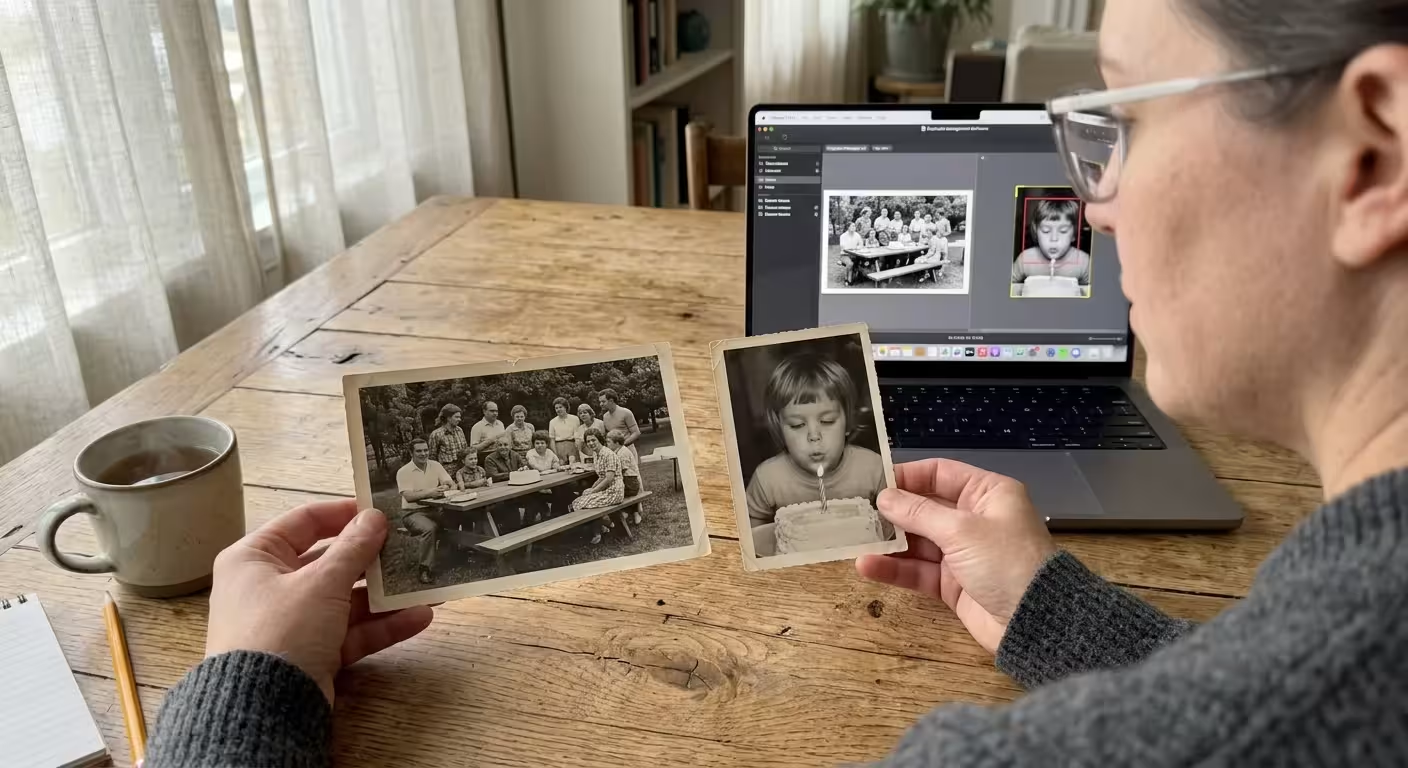
Consider a 1954 wedding negative scanned at 4000×3000 pixels showing thirty guests standing outside a church. A relative may have cropped that master scan to an 800×800 headshot of their grandmother.
Naive deduplication software configured with an aggressive visual similarity tolerance flags both images as duplicates. The software identifies identical facial features and groups the two pictures into a single deletion candidate set.
Consumer tools often employ automated deletion rules to save storage space quickly. These utilities typically delete the smaller file size or keep whichever file has the most recent modification date.
Under these flawed rules, the tool marks your uncropped, high-resolution master scan for permanent deletion. The automated script preserves only the low-resolution, tightly cropped JPEG created for an online profile.
Cropping shifts the spatial frequency distribution across the entire frame. Because perceptual hashing samples global luminance frequencies, tight crops can distort hashes in unpredictable ways or trigger disastrous false positives.
Archival preservation requires verifying aspect ratios and pixel dimensions before confirming any deletion candidate. Without dimensional safeguards, automated cleaners will discard the wider contextual details of your family records.
Worked Example: Deduplicating a 120 GB Multi-Cloud Family Archive
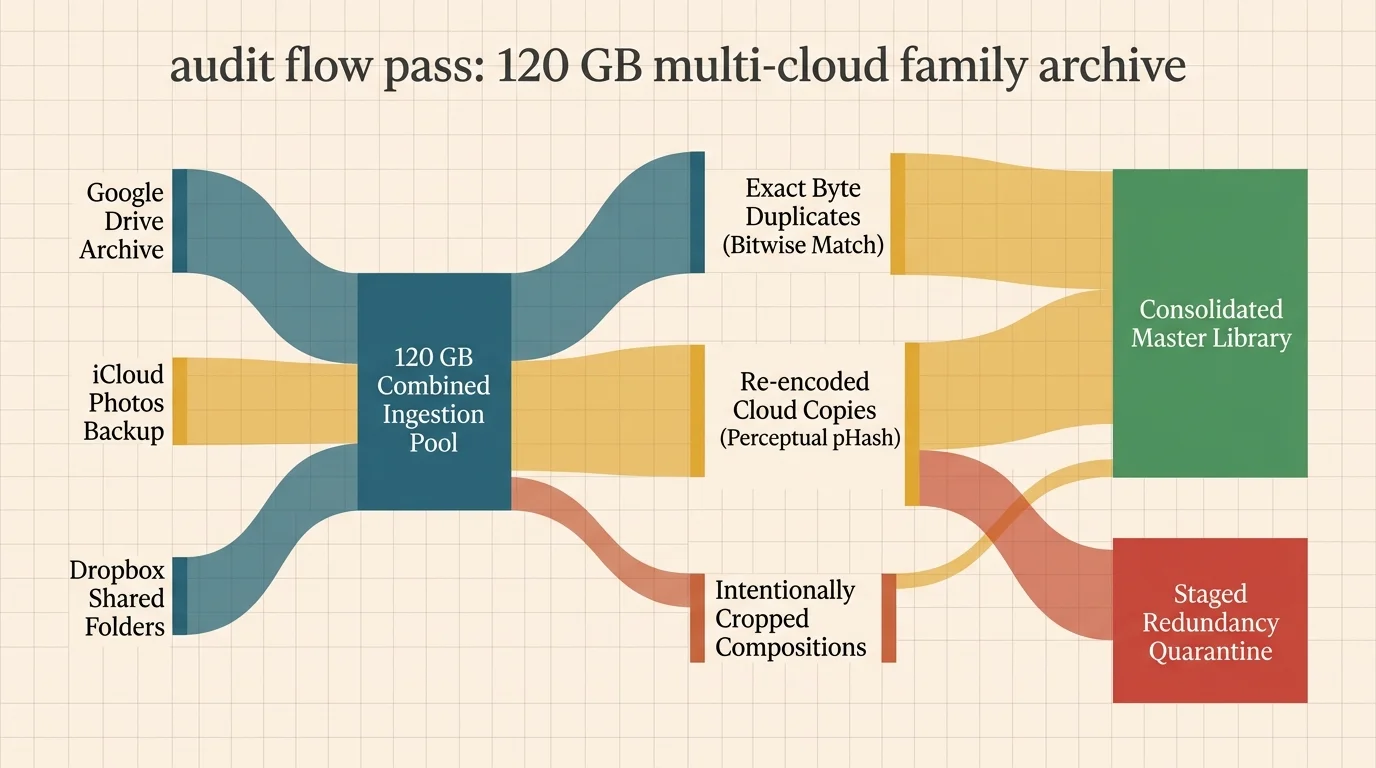
To demonstrate a safe deduplication workflow, we examine a real-world scenario involving a fractured 120 GB archive. The collection contains 28,450 image files gathered from Google Drive, Apple iCloud, and Dropbox folders.
The archive curator first consolidated all files onto a local 2 TB external drive formatted in APFS. Operating directly on live cloud sync folders risks immediate synchronization race conditions and accidental server-side purges.
The curator executed Pass 1 using a multi-threaded SHA-256 binary scanner. The tool processed 28,450 files in 11 minutes, discovering 4,120 exact binary duplicates created by identical cross-cloud folder uploads.
Deleting these 4,120 identical files reclaimed 18.4 GB instantly without inspecting visual content. The remaining 24,330 unique files moved directly to the perceptual analysis stage.
For Pass 2, the curator executed a custom perceptual hash script setting a conservative Hamming distance threshold of $\le 3$. The script compared all 24,330 images across 64-bit frequency vectors in 26 minutes.
The algorithm flagged 3,210 suspected near-duplicate pairs caused by cloud compression and messaging app downscaling. Rather than executing auto-delete, the curator applied an automated preservation filter based on pixel area.
The filter compared total resolution: $Width \times Height$. The script automatically retained the larger master file and quarantined the compressed version whenever the aspect ratios matched within a 1 percent tolerance.
This automated filter resolved 3,010 pairs safely, keeping the 12-megapixel camera originals over downsampled 2-megapixel cloud previews. This step recovered an additional 14.4 GB of storage space.
The remaining 200 pairs exhibited aspect ratio divergences greater than 5 percent, indicating deliberate cropping. The script routed these 200 pairs into a manual inspection queue for historical evaluation.
During manual review, the curator discovered that 165 pairs were intentional archival crops preserving faces from wide banquet photos. The curator retained both versions, categorizing the tight crops into dedicated portrait subfolders.
The entire two-pass workflow reclaimed 32.8 GB across the 120 GB collection. More importantly, the system preserved 100 percent of original composition data and avoided losing a single historic negative scan.

Technical Matrix: Evaluating Deduplication Technologies
Different deduplication algorithms produce radically different results on historic photo libraries. You must select the right algorithmic approach based on the specific degradation present in your multi-cloud collection.
The following matrix compares primary deduplication technologies across critical performance and safety parameters. Review these metrics to prevent accidental data loss during your archival cleanup.
| Technology | Compression Resilience | Cropping Resilience | Scanning Speed (Files/Sec) | Archival False-Positive Risk |
|---|---|---|---|---|
| SHA-256 / MD5 Checksum | Zero (Fails completely) | Zero (Fails completely) | 1,200 | Zero (100% exact matches) |
| Average Hash (aHash) | Moderate | Extremely Poor | 850 | High (Conflates low-contrast scans) |
| Difference Hash (dHash) | High | Poor | 800 | Moderate (Sensitive to gradients) |
| Perceptual Hash (pHash) | Extremely High | Poor to Moderate | 450 | Low (When Hamming distance ≤ 4) |
| SIFT / ORB Feature Match | Immune | Extremely High | 15 | Near Zero (Matches sub-regions) |
Binary hashing provides the highest scanning velocity and absolute safety for unedited transfers. However, it fails completely when cloud services compress files or strip EXIF metadata.
Perceptual hashing (pHash) offers the ideal balance of speed and resilience against lossy cloud re-encoding. You must govern pHash with strict Hamming thresholds to prevent grouping separate images together.
Feature-matching frameworks like SIFT detect cropped sub-regions accurately, but their heavy computational demands make scanning large archives slow. Reserve feature matching for quarantines where aspect ratios diverge.
Step-by-Step Safe Multi-Pass Deduplication Workflow
Executing an uncontrolled sweep on a live cloud directory invites catastrophe. Follow this tested, multi-pass sequence to remove duplicate photos cloud libraries accumulate without endangering master scans.
Begin by consolidating your distributed cloud libraries onto a local physical workstation. Download all original assets from Google Takeout, iCloud Drive, and Dropbox into distinct, read-only staging directories.
Create a verified cold backup of your consolidated staging directory on a secondary external drive. Never begin any deduplication process until you establish an immutable offline baseline.
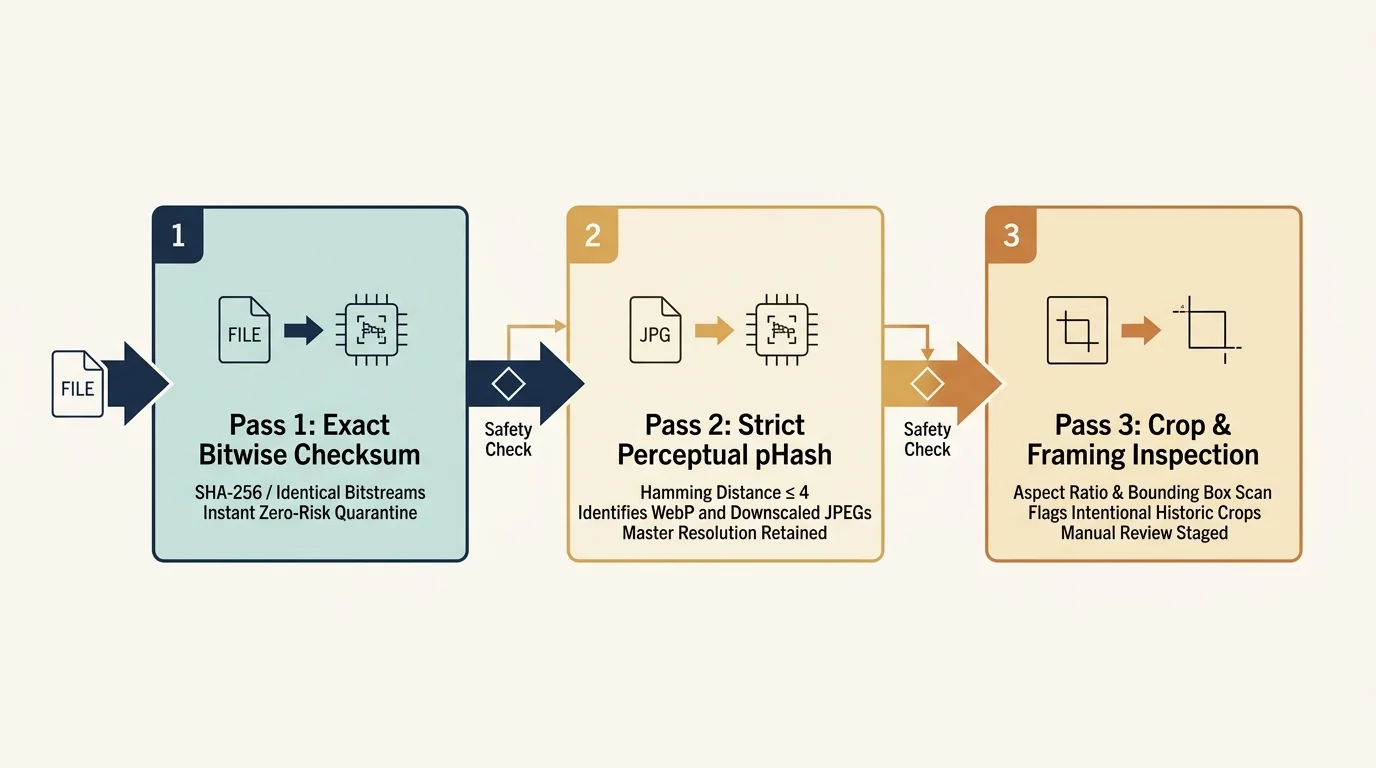
Execute your first pass using an open-source binary deduplicator like Czkawka or dupeGuru set strictly to exact hash mode. This sweep removes identical files that share exact byte sequences across cloud backups.
Configure your utility to automatically delete binary duplicates that match in both hash and modification time. This initial sweep strips out pure redundancy without analyzing image pixels.
Initiate your second pass using perceptual hashing with the Hamming distance set to a strict value of 2 or 3. This pass isolates re-compressed copies, WebP cloud conversions, and stripped metadata variants.
Apply an automated resolution evaluation rule to every candidate group generated by your perceptual pass. Instruct your system to preserve the file with the highest total pixel count ($Width \times Height$).
Enforce an aspect ratio gate before approving any automatic deletion candidate. If the aspect ratios of two matching files diverge by more than 2 percent, route both images into a review folder.
Manually inspect the quarantined aspect-ratio mismatches on a calibrated desktop monitor. Verify whether the smaller image contains a unique historical crop or redundant desktop thumbnail junk.
After verifying your local deduplicated master archive, generate a new cryptographic manifest. You can then synchronize this clean master library back to your primary secure cloud backup provider.

Preserving EXIF and Master Archival Metadata
Deduplication involves more than simply preserving the sharpest pixel raster. The best photo deduplication method must also protect the rich historical metadata attached to disparate files.
Family members often annotate photos differently across different platforms. One relative may add tags in Apple Photos, while another enters caption descriptions inside Google Photos.
A compressed cloud image may carry complete GPS coordinates and date tags, while the uncompressed master TIFF scan lacks metadata entirely. Blindly deleting the compressed duplicate destroys that historical documentation.
You can merge metadata across matching pairs before completing deletions by consulting the Library of Congress preservation guidelines for digital master records. Archival standards mandate maintaining descriptive metadata alongside master visual assets.
Use command-line utilities like ExifTool to copy tags from cloud duplicates directly into your master files. Run the following command structure to preserve vital historical tags before purging redundant files:
exiftool -tagsFromFile source_compressed.jpg -AllDates -GPS* -Keywords target_master.tif
This command extracts timestamp records, geographic tags, and embedded keywords from the compressed file. It writes those parameters directly into the archival TIFF header without altering underlying image pixels.
Maintain separate descriptive sidecar files (XMP) when working with proprietary RAW files or uncompressed scans. Keeping metadata independent of image rasters protects your files from accidental corruption during deduplication.
Frequently Asked Questions
Why does exact MD5 deduplication miss photos uploaded to Google Photos?
Google Photos recompresses uploaded images to save bandwidth and server space unless you pay for original storage. This compression alters image byte arrays and strips EXIF tags, generating completely different MD5 checksums.
What is the safest Hamming distance threshold for perceptual photo deduplication?
A Hamming distance of 2 to 4 provides the safest operating window for general photo libraries. Distances above 6 produce severe false positives, grouping distinct photos taken in similar lighting into deletion queues.
Can perceptual hashing detect if a photo has been heavily cropped?
No, standard perceptual hashing struggles with tight crops because cropping alters the global low-frequency energy of the image. Detecting crops requires local feature-matching algorithms like SIFT or deep learning embedding models.
Should I delete duplicate photos directly inside cloud sync folders?
Never run deduplication tools inside active cloud synchronization folders. Sync conflicts can corrupt your file catalog, and aggressive local deletions might trigger automated server purges across connected family accounts.
Disclaimer: This article is for informational purposes only. When handling valuable or irreplaceable photographs, consider consulting a professional conservator. Always test preservation methods on non-valuable items first.






1 Comment